Give your first game a small, recognizable sound palette
A coin, a mistake and a door opening shouldn't all sound like variations of the same explosion. I'd give each event a distinct role before generating any audio. Your player needs to recognize what happened without stopping to think about the sound.
List the events that need feedback
Start with the actions in one complete round. You might need a button press, a jump, a reward, a warning and an ending. Skip ambience and decorative details until those events communicate clearly.
Describe each sound in plain terms: short wooden click, bright two-note reward, low restrained warning. Include an approximate duration and whether the sound should feel close or distant.
I would keep a shared material palette. Wooden switches and soft bells can belong together; adding a huge metallic impact to every small action makes it harder to tell which event matters.
Use the generator's controls deliberately
ElevenLabs' Sound Effects guide describes the controls in the playground. Each Generate produces four variations. You can set a fixed duration or choose auto, up to a maximum of 30 seconds. Turn on Looping only when the ending should blend back into the beginning without a noticeable gap. The prompt influence setting starts at 30% and controls how closely the output follows your description.
When you have a usable result, open History to review and download it. The download options are MP3 at 44.1 kHz or WAV at 48 kHz. Star the variations worth keeping so your favorites are easier to revisit.
Trim the result into an asset
Listen for the useful part of a generated clip. Remove unnecessary silence before the attack so the sound begins when the action happens. Add a tiny fade where a cut produces a click, and keep enough tail for the sound to end naturally.
Make a few subtle variants for actions that repeat often. Judge them together: a variant that is much louder or longer will stand out every time it plays.
Save the source, edit and usage record together. Before publishing, check the terms that apply to the generator and account used for the asset.
Test repetition and competing sounds
Trigger the effect in the game. A pleasing sound in an editor can feel late when attached to a jump, or too long when coins are collected in quick succession.
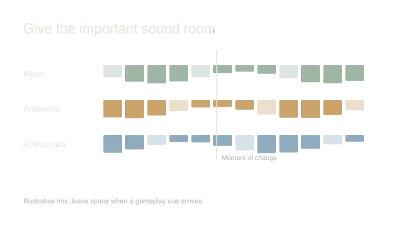
Try several events at once. Limit overlapping instances where rapid repetition creates a wall of noise, and make sure a warning remains recognizable under music.
I'd finish by playing with my eyes briefly away from the main action in a safe test scene. Can I tell whether I collected something, took damage or completed the round? If every event sounds equally urgent, simplify the palette before adding more effects.
Sources and further reading
- ElevenLabs: sound effects — accessed Sep 9, 2026
- Sound effects (product guide) | ElevenLabs Documentation — accessed Sep 11, 2026
Made something playable?
Share your game, world or experiment with people exploring what AI can help create.
Add your space