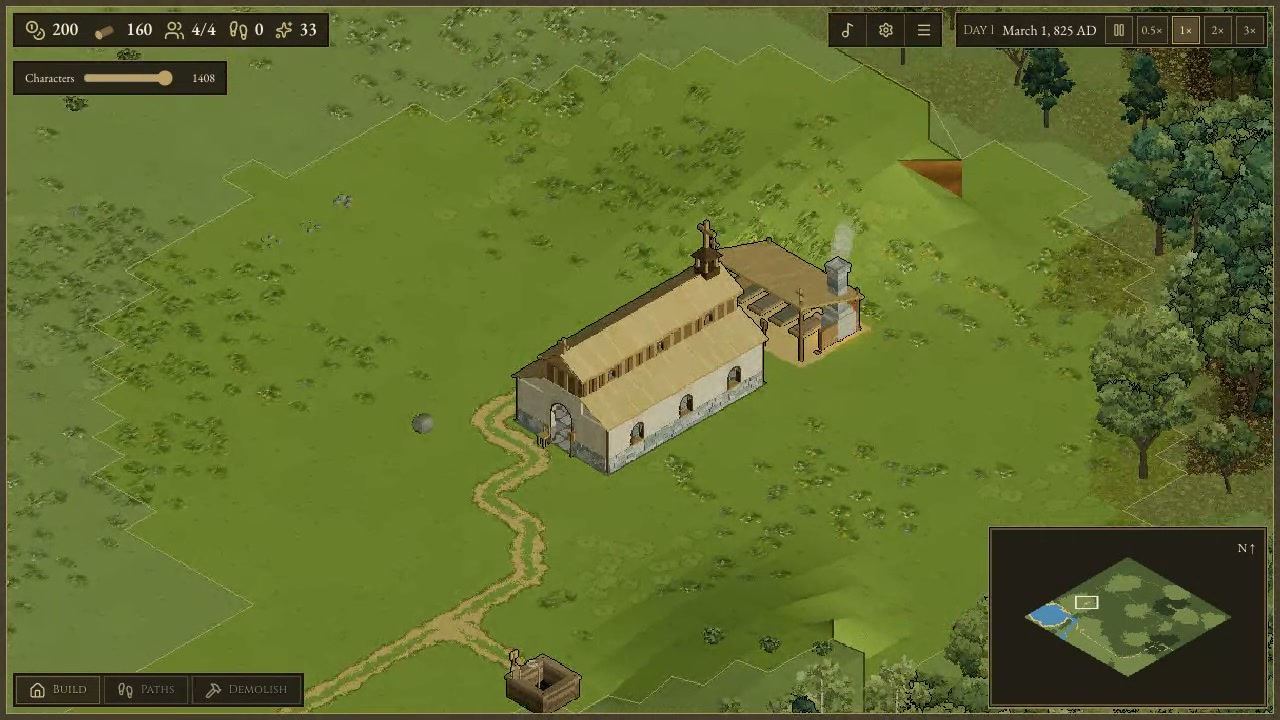
You build a medieval settlement around a church on a generated map. You lay paths, raise buildings, and watch characters walk through the settlement.
You see the church from above, with grassland, trees, and water around it. A minimap shows more of the terrain while the date and settlement counts remain on screen.
How to play
- Start with a church on the map.
- Use Build to place buildings and Paths to lay paths.
- Use Demolish to remove things you have placed.
- Pause the simulation or change its speed as the days pass.
Controls
| Input | Action |
|---|---|
| Building | |
| Click | Select Build, Paths, or Demolish |
| Simulation | |
| Click | Pause or change simulation speed |
| Settings | |
| Click | Open New map, Sound settings, World settings, or Menu |
| Click | Toggle light mode |
Features
- Generated map with grassland, trees, and water
- Church at the center of the starting settlement
- Build, Paths, and Demolish options
- Minimap and settlement counts
- Day and date display with simulation speed controls


Comments