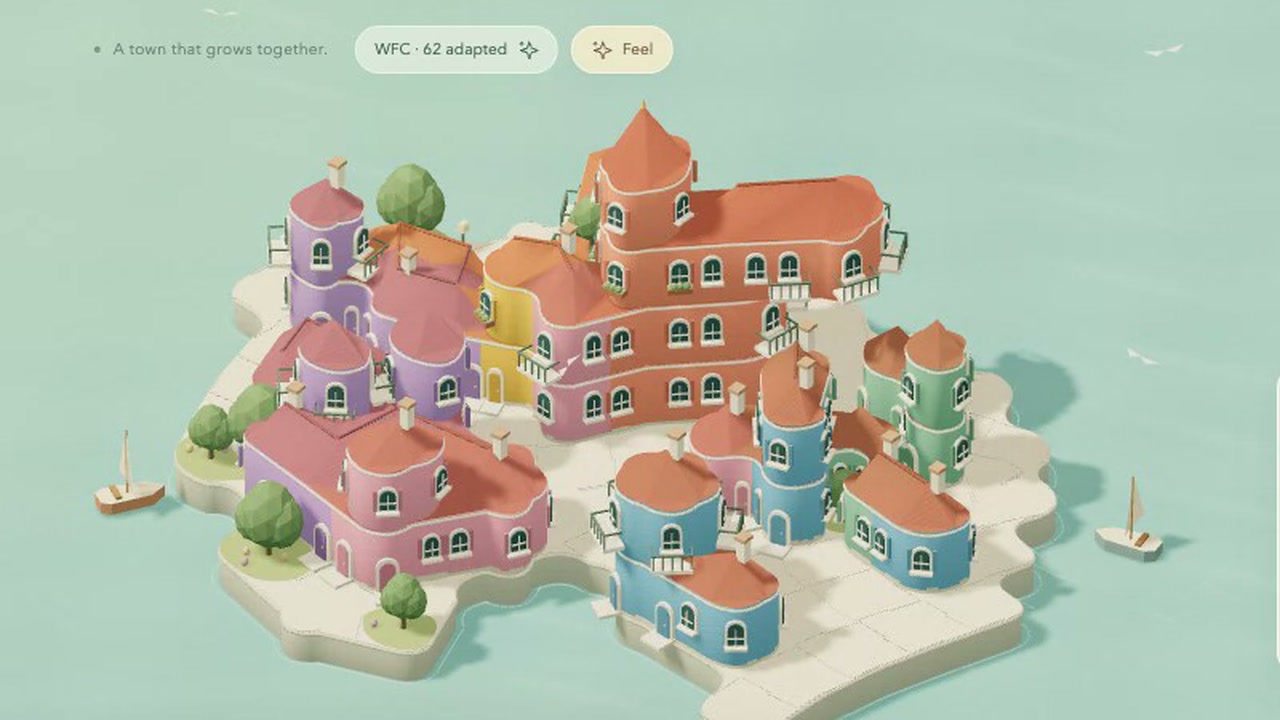
You build a little seaside town on an island. You click to place houses, quays and gardens, and the neighbouring buildings change shape as the town grows.
Pastel buildings with terracotta roofs cluster beside pale paths and turquoise water. You can choose from 8 colours, explore the island from different angles and switch to nighttime. Your town is saved on this device.
How to explore
- Select Build, Quay or Garden, then click the island to place it.
- Choose a colour and use Paint to change the town's look.
- Drag to explore and scroll to zoom.
- Use Remove or right-click to take something away, or use Undo to reverse a change.
Controls
| Input | Action |
|---|---|
| Build | |
| Click | Build with the selected tool |
| Right-click | Remove |
| Build | Select houses |
| Quay | Select quays |
| Garden | Select gardens |
| Paint | Select painting |
| Remove | Select removal |
| Undo | Reverse a change |
| Redo | Restore a change |
| Camera | |
| Drag | Explore the island |
| Scroll | Zoom |
Features
- Pastel houses on a small seaside island
- Buildings reshape as the town grows
- Quays, gardens and 8 paint colours
- Day and nighttime views
- Photo button and locally saved town




Comments