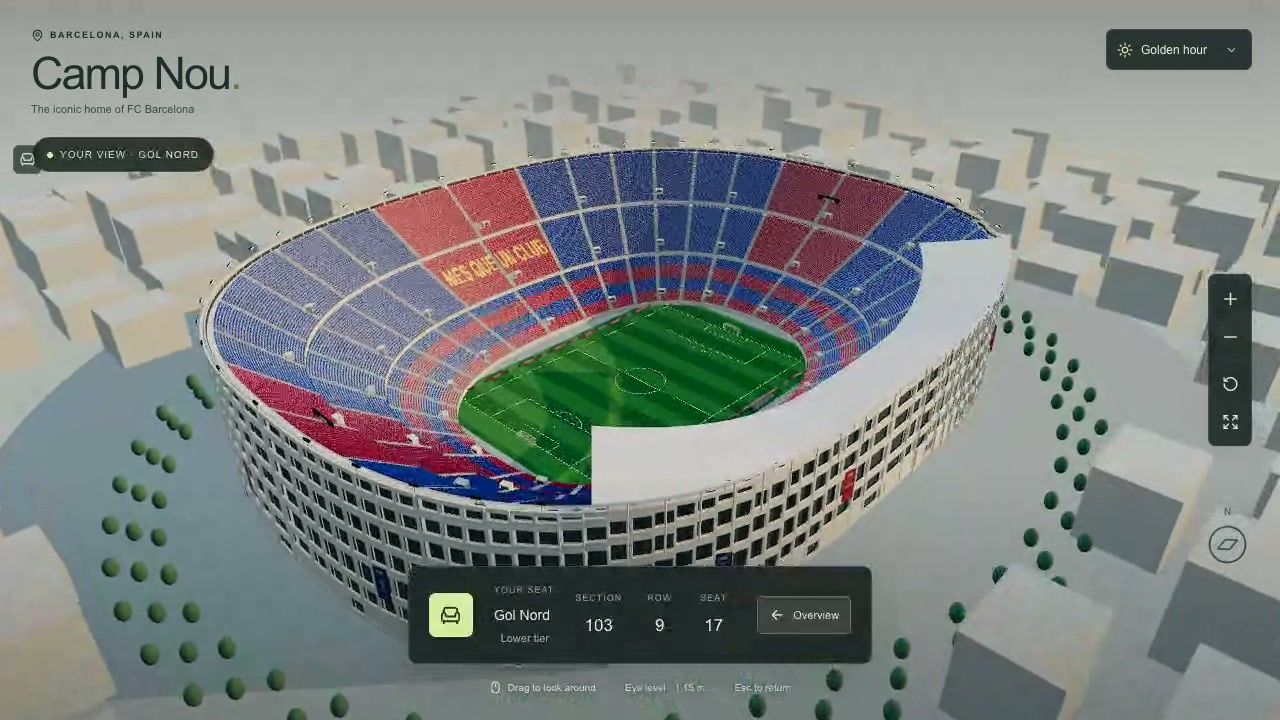
You explore a 3D recreation of Camp Nou and choose a seat to see the pitch from that spot. You can use the seat finder or click a seat in the stadium.
You see red and blue stands around the pitch, with the stadium exterior and surrounding buildings visible from above. You can switch between daylight, golden hour and stadium lights.
How to explore
- Start in the stadium overview.
- Choose a tier, section, row and seat, then select See the view, or click a seat in the stadium.
- Drag to look around from your seat.
- Press Esc to return to the overview and choose another view.
Controls
| Input | Action |
|---|---|
| View | |
| Drag | Orbit in the overview or look around from a seat |
| Scroll | Zoom |
| Click | Select a seat in the stadium |
| Esc | Return from the seat view |
| Buttons | |
| See the view | Open the selected seat view |
| Overview | Return to the stadium overview |
| Zoom in/Zoom out | Change the zoom |
| Reset overview | Reset the overview camera |
| Stadium/Exterior/Top view | Switch overview views |
| Auto orbit | Toggle automatic orbit |
| Daylight | Choose the lighting |
Features
- 86,964 individually selectable seats
- Seat finder with tier, section, row and seat choices
- Preset views from the middle, lower and upper tiers
- Daylight, golden hour and stadium lights
- Pre-renovation recreation of Camp Nou



Comments