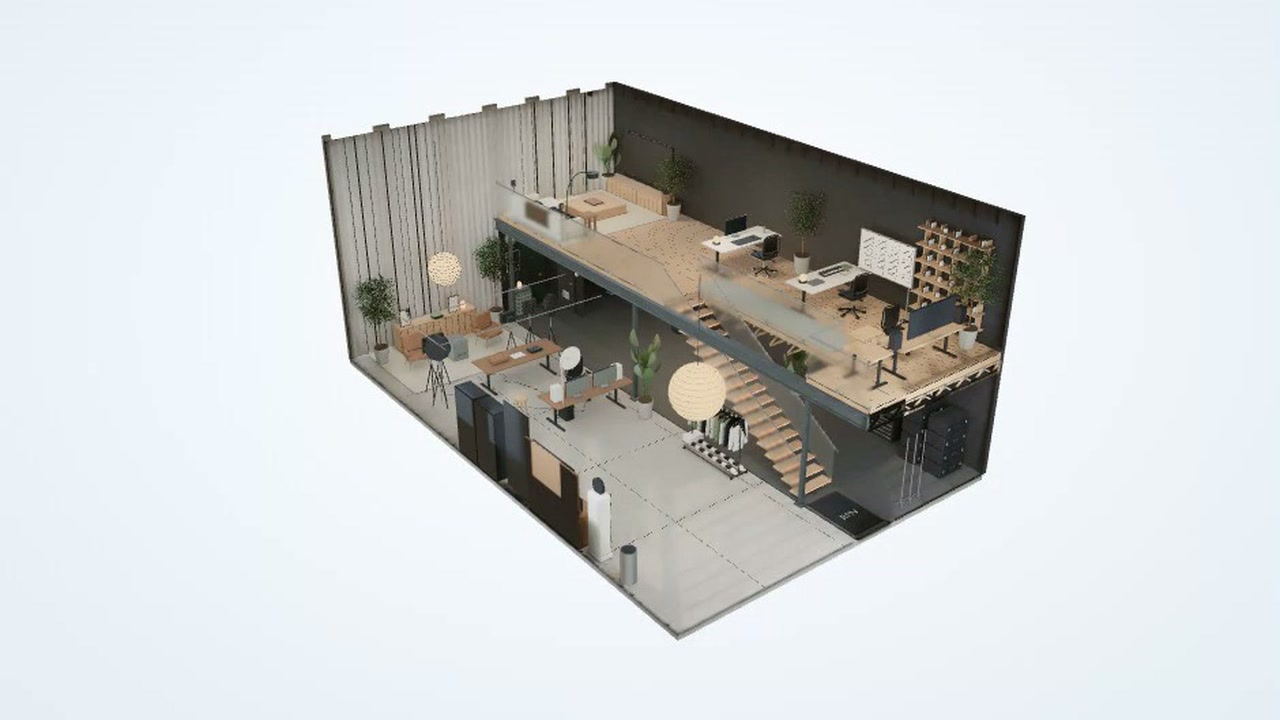
You explore a 2-level creator’s studio reconstructed from photos and a walkthrough. You can orbit, pan, or walk through the 3D model and switch between the whole studio and named areas.
The cutaway shows desks, a recording area, a training space, a lounge, and an open loft. Stairs connect the floors, while the cutaway view lets you see inside from different angles.
How to explore
- Open the interactive 3D view.
- Drag to orbit, right-drag to pan, or scroll to zoom.
- Choose a named area to focus on it, or switch to Walk to move through the studio.
- Use Reset to whole studio to return to the full view.
Controls
| Input | Action |
|---|---|
| View | |
| Drag | Orbit the model |
| Right-drag | Pan the view |
| Scroll | Zoom |
| Orbit | Select orbit mode |
| Pan | Select pan mode |
| Walk | Select walk mode |
| Buttons | |
| Rotate left/Rotate right | Turn the view |
| Tilt up/Tilt down | Tilt the view |
| Zoom out/Zoom in | Change the zoom |
| Reset to whole studio | Return to the full view |
| Cutaway view | Toggle the cutaway |
| Show ceiling | Toggle the ceiling |
Features
- Interactive 3D studio with 2 levels
- Cutaway view and ceiling toggle
- Named views from the entrance to the lounge
- Auto rotate option
- Blender renders and a LEGO version
- Downloadable 3D model


Comments