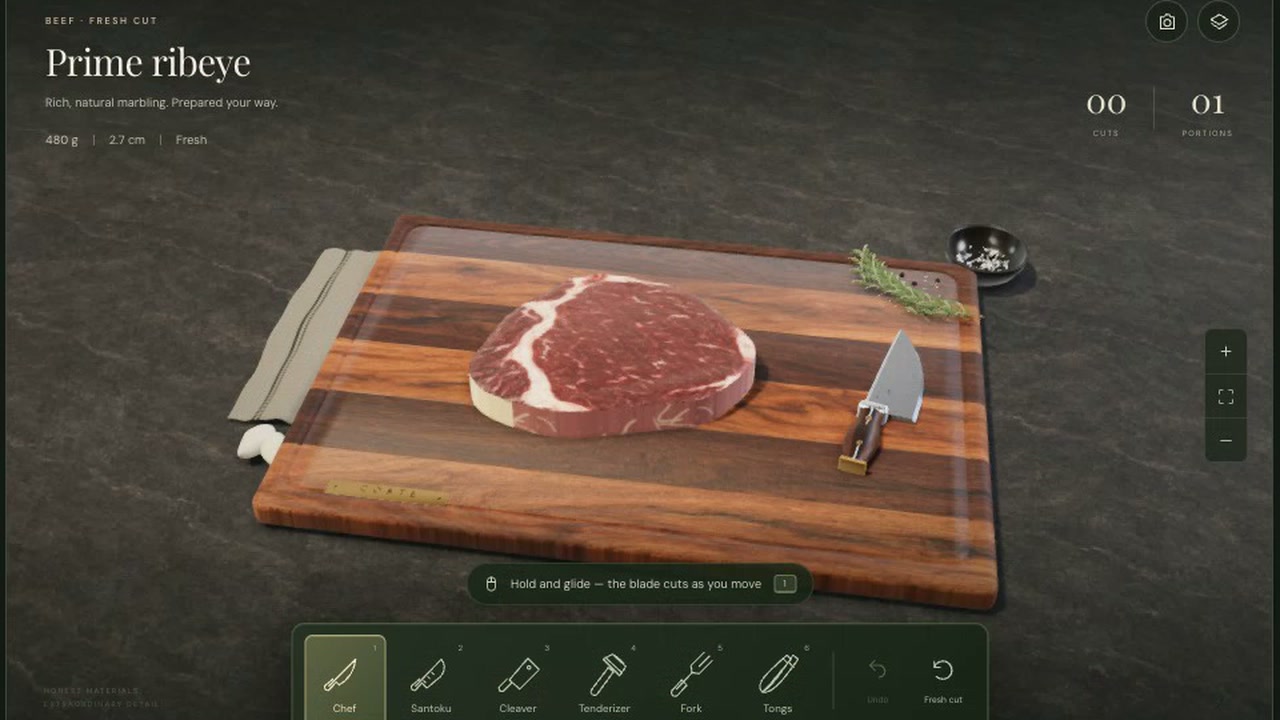
You prepare a cut of meat or fish on a 3D workbench. You choose a tool, then hold and glide the blade across the cut. The workbench tracks your cuts and portions.
The wooden board, marbled ribeye, knives and small countertop details give you a close view of the work. Free play lets you cut at your own pace, with no recipe or timer shown.
How to explore
- Start with the prime ribeye or select another cut.
- Choose a tool from the workbench.
- Hold and glide the blade across the cut to slice it.
- Watch the cuts and portions counters update.
- Use Undo to reverse a cut or Fresh cut to start over.
Controls
| Input | Action |
|---|---|
| Cutting | |
| Drag | Hold and glide the blade to cut |
| Tools | |
| 1 | Select Chef |
| 2 | Select Santoku |
| 3 | Select Cleaver |
| 4 | Select Tenderizer |
| 5 | Select Fork |
| 6 | Select Tongs |
| Workbench | |
| Click | Select a cut or use Undo and Fresh cut |
| Camera | |
| Click | Toggle overhead view |
| Click | Zoom in or out |
| Click | Reset camera |
Features
- 5 selectable cuts of beef, pork, poultry and fish
- 6 selectable tools
- Cuts and portions counters
- Undo and Fresh cut buttons
- Overhead view, zoom and camera reset
- A 3D wooden workbench with detailed food materials










Comments