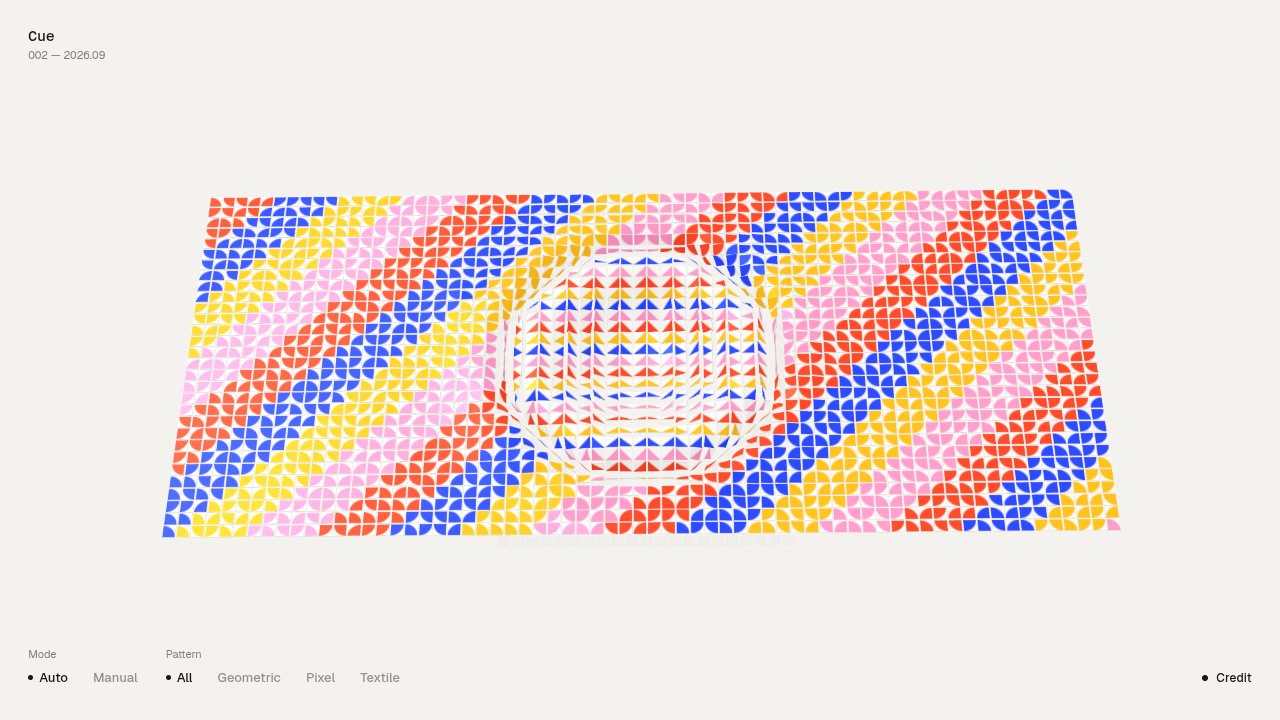
You watch rows of cards flip in sequence as their patterns change. You can let the sequence run in “Auto” or choose “Manual” to cue the flips yourself.
The cards form a wide panel against a pale background. Their small colored shapes shift between repeating designs and a pink field with a yellow smiley face.
How to explore
- Watch the card-flip sequence in “Auto”.
- Select “Manual” to cue the flips yourself.
- Choose “All”, “Geometric”, “Pixel”, or “Textile” to select a pattern family.
Controls
| Input | Action |
|---|---|
| Mode | |
| Click “Auto” | Run the card-flip sequence |
| Click “Manual” | Switch to manually cued flips |
| Pattern | |
| Click “All” | Show all pattern families |
| Click “Geometric” | Select geometric patterns |
| Click “Pixel” | Select pixel patterns |
| Click “Textile” | Select textile patterns |
Features
- Rows of cards flip in sequence
- Patterns change with each turn
- Automatic and manual modes
- Geometric, pixel, and textile pattern families
- Colorful card designs on a pale background











Comments