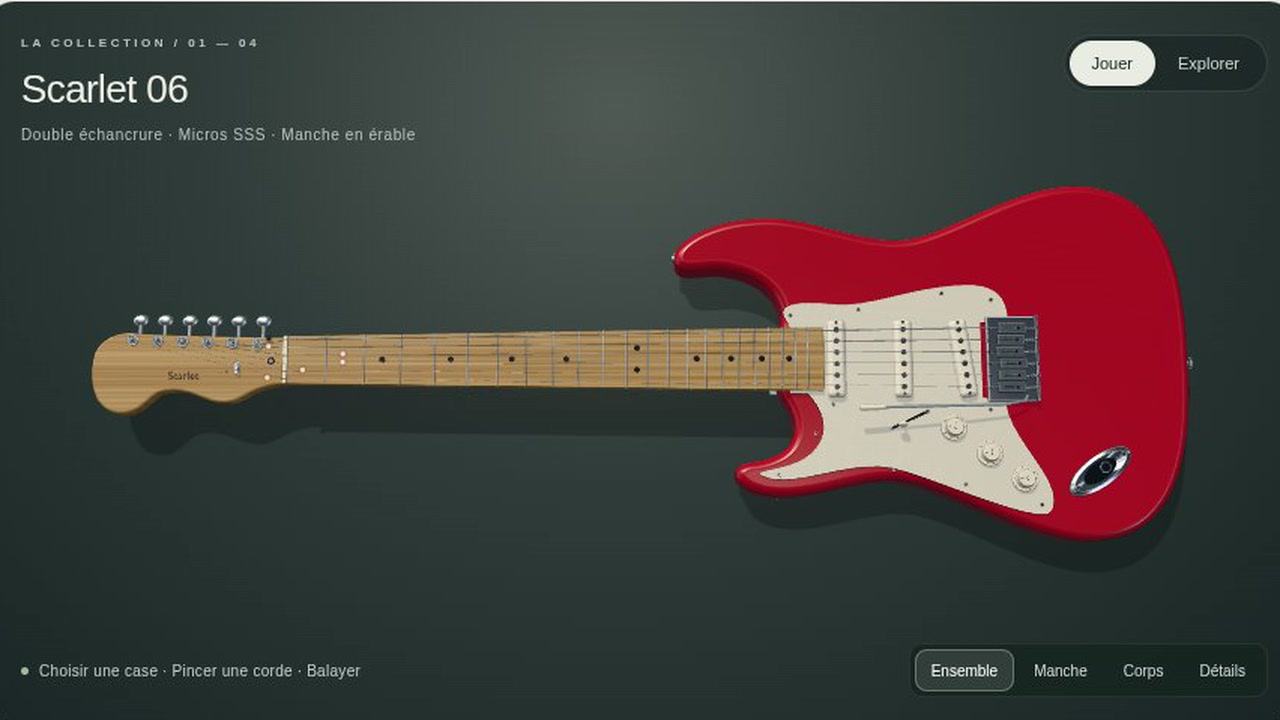
You choose from 4 electric guitar models and 8 finishes, then play their strings. You can select a chord or set the frets on each string yourself.
A large 3D guitar fills the screen against a dark background. You can switch between views of the whole guitar, neck, body and details. Sound presets and effect controls let you change what you hear as you play.
How to use it
- Activate sound and choose a guitar and finish.
- Select a chord or set the fret for each string.
- Click a string to pluck it, or drag across the strings to strum.
- Choose a sound preset and adjust the sound controls as you play.
Controls
| Input | Action |
|---|---|
| Play | |
| Click | Pluck a string or select a fret |
| Drag | Strum across the strings |
| U/I/O/J/K/L | Play strings from the keyboard |
| Esc | Mute the strings |
| Choose and adjust | |
| Click | Select a guitar, finish, chord, view or sound preset |
| Drag | Adjust sound controls |
Features
- 4 guitar models with 8 finishes
- 3D views of the whole guitar, neck, body and details
- Chord library with major, minor, 7th and colour categories
- Individual fret and mute settings for 6 strings
- 5 sound presets with pickup, gain, tone, reverb and volume controls











Comments